

The form of an electronic tax invoice in Saudi Arabia is more than a printed design or a PDF file showing the sale. The invoice must be issued from a compliant electronic system, include the required tax data, and be generated and stored in a structured electronic format that can be processed and connected to the systems of the Zakat, Tax and Customs Authority (ZATCA).
E-invoices in the Kingdom fall into two kinds: the tax invoice, usually issued in business-to-business transactions, and the simplified tax invoice, usually issued when selling to the end consumer. A handwritten invoice, one created in a word processor, or a scanned image does not count as an approved e-invoice.
E-invoicing was introduced in two phases: the generation and storage phase from 4 December 2021, then the integration phase, applied to groups of businesses from 1 January 2023. Phase 2 requires the businesses included in each wave to connect their invoicing systems to the Fatoora platform, and to issue and store invoices in the specified electronic formats.
What an electronic tax invoice looks like
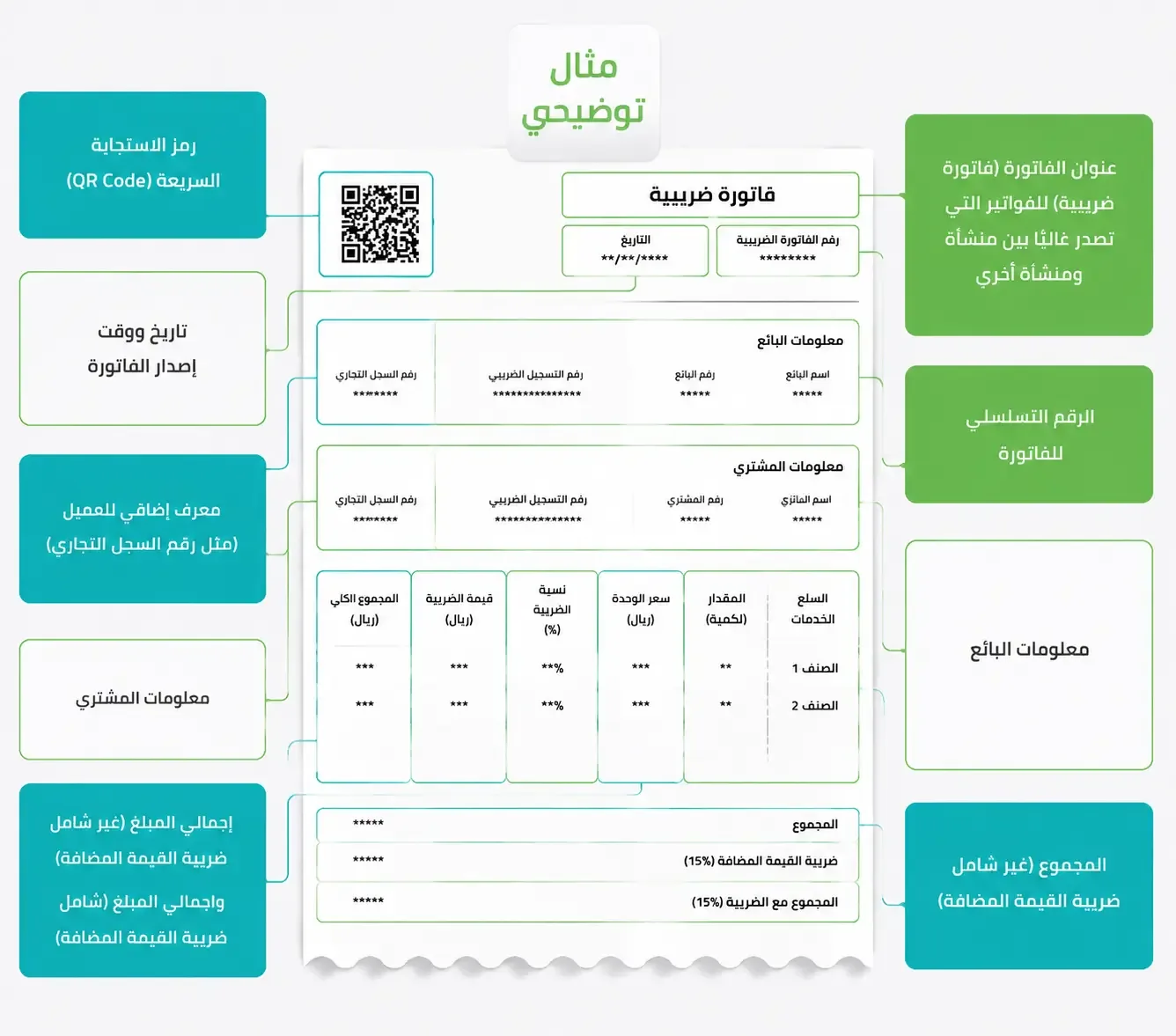
ZATCA does not impose a single visual design that every business must use, so an invoice’s colors, field order and logo position can differ from one system to another. But the invoice must include the mandatory data, and it must be issued and stored in a structured electronic format that can be read and processed automatically.
An electronic tax invoice usually consists of the seller’s and buyer’s details, the invoice number with its issue date and time, the details of the goods or services, the VAT rate and amount, and the totals, plus the QR code and the technical data required by the invoice type and the implementation phase.
Invoice title and issue details
The top of the document shows the invoice type, such as “Tax invoice” or “Simplified tax invoice”, along with the serial number, the issue date and time, and the currency used. Every invoice must have a unique number within an orderly sequence, so it can be referred to and linked to its financial transaction without duplicates or conflicts.
Seller information
The invoice includes the business’s name and address, its VAT registration number and any additional identifiers required, such as the commercial registration number, plus the details of the branch that issued the invoice when there is more than one branch.
Buyer information
Buyer details are more detailed on a tax invoice and may include the name, address and VAT registration number where the requirements apply. A simplified tax invoice, usually issued to the end consumer, does not normally need all the buyer details found on a tax invoice.
Details of the goods or services
The main part of the invoice describes the goods or services, with quantities, prices, discounts, taxable amounts, the tax rate and amount, and the total for each line. This detail helps match the invoice with the sales order, contract or purchase order.
Invoice totals
The invoice shows the total before VAT, the discounts applied, the taxable amount, the tax amount and the final total including tax.
QR code
The QR code holds electronic data that helps read the main information linked to the invoice. How the code and its technical data are generated depends on the invoice type and the requirements of the integration phase.
For a simplified tax invoice, the invoicing system generates the QR code before the invoice is given to the customer. A tax invoice that goes through clearance is processed through the Fatoora platform according to the applicable technical requirements.
The invoice’s electronic format
An e-invoice is not just the readable copy the customer sees. In the integration phase, the invoice must be generated as XML, or as a PDF/A-3 file with the XML embedded, so that ZATCA’s systems can read and process the data electronically.
That is why creating an invoice in Word and converting it to PDF is not enough to meet the e-invoicing requirements.
Tax invoice elements and requirements
Some invoice requirements differ by document type and by the nature of the customer and the transaction. The main differences are:
| Element | Tax invoice | Simplified tax invoice |
|---|---|---|
| Usual use | Business-to-business transactions | Sales to the end consumer |
| Document type | Tax invoice | Simplified tax invoice |
| Seller details | Required | Required |
| Buyer details | The required buyer details, including the VAT number where it applies | Not usually required, though some cases need certain details |
| Details of goods or services | Required | Required |
| Tax and totals | Required | Required |
| Electronic format | XML, or PDF/A-3 with embedded XML | XML, or PDF/A-3 with embedded XML |
| Processing in Phase 2 | Clearance before the invoice is shared | Reporting within 24 hours of issue |
| QR code | Added by the Fatoora platform after clearance, then shown by the system on the readable copy | Generated by the invoicing system before the invoice is handed to the customer |
The invoice must be issued in Arabic, and another language can be added alongside it. It must also be stored electronically, and it must not be deleted or have its data edited directly after it is issued.
When an error is found in an issued invoice, it is corrected with a credit or debit note linked to the original invoice, rather than by deleting the document or editing its data by hand.
How to create an electronic tax invoice
Creating an electronic tax invoice goes through several steps, from setting up the business’s data to storing the invoice and updating the financial records.
1. Use a compliant e-invoicing system
The invoice must be issued from accounting software or an ERP system that can generate invoices in the required format, connect to the internet, integrate with external systems, and prevent tampering with invoices or creating more than one unordered sequence.
2. Set up the business’s tax data
The business’s name, address, VAT number, commercial registration, currencies, branches and tax rates are recorded in the system. Review this data before you start issuing invoices, because it appears automatically on every document.
3. Choose the invoice type
The system sets the invoice type based on the customer and the transaction:
- A tax invoice for transactions that usually take place between two businesses.
- A simplified tax invoice for transactions that usually take place between a business and the end consumer.
Choosing the right type matters, because the way the invoice is sent and the data it needs can differ between the two.
4. Enter the customer and product details
The customer’s details are added, then the products or services, quantities, prices and discounts are chosen. With an integrated ERP system, this information can be pulled straight from the quotation, sales order or contract instead of being entered again.
5. Calculate the tax and totals
The system calculates the taxable amount, the applicable VAT rate, the tax amount and the final total. Make sure the right tax treatment is applied, especially when some lines are taxed at different rates or are exempt.
6. Generate the invoice and send it electronically
In the integration phase, how the invoice is handled depends on its type. A tax invoice is sent to the Fatoora platform for clearance before it is shared with the buyer, while a simplified tax invoice is generated and given to the customer directly, then reported to the platform within 24 hours of being issued.
7. Update the accounts and inventory
In an ERP system, the process doesn’t end when the invoice is issued or cleared. Its data can be reflected straight away in the accounts, inventory and related operations, such as:
- Recording the sales and tax entry.
- Updating the customer’s account and receivables.
- Reducing the stock of the items sold.
- Recording the cost of goods sold.
- Updating the sales and VAT reports.
- Following up on collection and the due date.
This is why invoicing should be connected to the sales, financial management, inventory and point-of-sale modules, instead of running each process in a separate program.
8. Store the invoice and track its status
The system stores the invoice, its electronic files, the result of its submission and its status, so the business can refer back to it when reviewing accounts, preparing the tax return or responding to audits.
The e-invoice cycle differs by invoice type and can be summarized as follows:
Tax invoice:
Sales order → generate the invoice → check the data → send it to the Fatoora platform for clearance → receive the cleared invoice → share it with the buyer → update the accounts and inventory.
Simplified tax invoice:
Sale → generate the invoice and add the QR code → hand it to the customer → update the accounts and inventory → report it to the Fatoora platform within 24 hours.
How does Logix ERP support e-invoicing?
Logix ERP connects e-invoicing with sales, financial management, inventory and point-of-sale operations, instead of treating the invoice as a document separate from the rest of the business’s operations.
The system provides a direct, automatic connection with the Fatoora platform. It generates the XML files and technical data linked to each invoice, and tracks invoices and notes and how they are reflected in operations and journal entries.
When an invoice is issued through the system, the customer’s account, receivables, inventory movement, and sales and VAT reports can be updated, which reduces the need to enter the same data in more than one program.
The integration between the system’s modules also helps companies that run several branches or issue large numbers of invoices to unify their workflow, track the status of every invoice and refer back to its data when preparing financial and tax reports.
Verifying a tax invoice
An electronic tax invoice can be verified by reviewing the data shown on it and scanning its QR code.
ZATCA provides an electronic service that lets users scan the code on the invoice and read the data linked to it.
After scanning the code, compare the information shown with the data printed on the invoice, especially:
- The seller’s name.
- The seller’s VAT registration number.
- The invoice’s issue date and time.
- The invoice total including tax.
- The total VAT.
It is also worth checking the description of the goods or services, the tax rates, the totals, the invoice type and, where required, the buyer’s details.
A QR code on its own doesn’t mean every detail of the document is correct, so the data shown should be reviewed and matched against the actual transaction.
Frequently asked questions
What is the difference between a tax invoice and a simplified tax invoice?
A tax invoice is usually issued when a registered business sells to another business, so it contains detailed information about the seller and the buyer, including the buyer’s VAT number where the requirements apply.
A simplified tax invoice is usually issued when selling to the end consumer, such as store, restaurant and point-of-sale receipts, and contains the main elements of the transaction and the QR code. Some specific cases allow different treatment, so the type should be chosen according to the nature of the supply and the tax requirements.
A simplified tax invoice can be issued in some business-to-business transactions when the value of the taxable supplies is under 1,000 Saudi riyals, under the applicable rules. Transactions between a business and the end consumer can be covered by a simplified invoice whatever the value of the supply.
How do you issue a tax invoice?
Issuing a tax invoice starts with a compliant e-invoicing system: record the seller’s and buyer’s details, then add the goods or services, quantities, prices, discounts and the value-added tax rate.
The system calculates the taxable amount, the tax amount and the final total, then generates the invoice in a structured electronic format.
After that, processing depends on the type: a tax invoice is sent to the Fatoora platform for clearance before it is shared with the buyer, while a simplified tax invoice is given to the customer and then reported to the platform within 24 hours of being issued.
With an integrated ERP system, the invoice is linked automatically to sales, accounts, inventory and collection, which reduces manual entry and helps follow the transaction from start to payment.
What are the requirements of a tax invoice?
The basic requirements are: issuing the invoice from a compliant electronic system; writing it in Arabic; adding the serial number and the issue date and time; the seller’s and buyer’s details and their tax registration numbers; the line details; the tax rates and amounts; and the totals before and after tax.
The invoice must also be generated in the required structured electronic format, include the QR code and technical data according to the invoice type and the applicable phase, be stored electronically, and not be deleted or edited after it is issued.
Choosing an integrated system such as Logix ERP helps a business turn invoicing from a separate task into a connected part of the sales, financial management and inventory cycle, while tracking each invoice’s status, keeping its data and relying less on manual entry.


